Today
7 /10 Mood · 6 /10 Energy
A daily check-in, two numbers and a line
Most mood apps ask too much and get abandoned in a week. This one asks for two numbers and, if you feel like it, a sentence. Over a month the averages, the low stretches and the notes on the good days say more about what helps than any quiz.
Mood and energy out of ten, once a day. That is the whole habit.
Also called a mood diary, mood journal or mood log.
One entry per session, with the timer and location always available. Add or rename variables any time in log settings.
| Variable | Type | Stats shown |
|---|---|---|
| Mood · /10 | Number | Average, Min |
| Energy · /10 | Number | Average |
| Timer | Built in | Total time, per entry duration |
| Location | Built in | Pin or place, shown on the log map |
| Notes, photos, sketches, voice memos | Built in | Attached to any entry |
A real screenshot, not a mockup: the stats up top, the streak and the calendar heatmap, with the entries below. Every number comes from the entries you add.
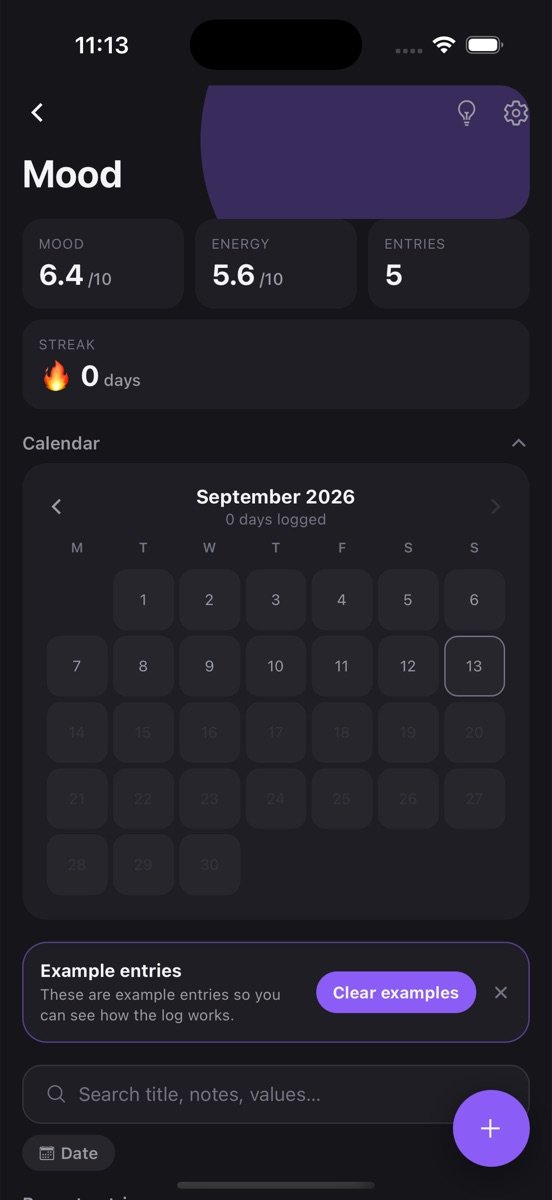
The log is created with the variables above and a few example entries so you can see how it works. Clear them with one tap.
Tap plus, fill in what you have, save. Timer, location, notes and photos are there when you want them, hidden when you don’t.
Average mood sits on the log card, with the rest one tap away. Set a goal if you want a nudge.
Two sliders’ worth of input and an optional note. A check-in you will still be doing in month three is worth more than a detailed one you drop in week two.
Average mood shows the trend; minimum mood shows how low the low days go. Both on the log card, both updated daily.
Read the notes on the 8s and the notes on the 3s side by side. The pattern is usually sleep, movement and people, in that order.
The Mood log is one log among many you can keep. Every one of them gets the same tools.
Tap the bulb on Mood and get a plain-language read of your trends, what changed recently, and a suggested next goal, built only from your own entries.
Set a target like three times a week, watch the rolling progress bar, keep a streak, and get a reminder at the time you actually log. The app learns that time from you.
Every log has its own month view showing which days you logged. Gaps are obvious, consistency is visible, and one tap opens that day's entries.
Every exercise in a workout, every piece in a practice session: logged together in one entry, broken out automatically in the stats.
Attach a photo, draw a quick sketch, or record a voice note on any entry. They stay with that entry and come back on every device you sign in on.
Drop a pin or search for the place. Each log has a map view of everywhere you logged, and saved places open directly in Google Maps.
Find an entry by title, note or value across every log, filter by date or location, and jump straight to it.
Entries save on your phone first and sync when you sign in. No account needed to start, no feed, no one else sees your data.
People working with a therapist who asked them to track mood between sessions, anyone adjusting medication who needs a clear before-and-after, and people who simply want to understand their own weeks better.
It is deliberately private and plain: no streaks, no badges, no sharing.
The average moves slowly and that is the point; it filters out single bad days. The minimum and the dates around it show whether low stretches are getting shorter. Energy tracked next to mood often reveals that the “bad mood” days are really tired days.
A month of one-line notes is enough to spot what the good days share, and that is more actionable than any score.
Doctors ask how often, how bad, how long and what came before. The five fields that answer that, how to log in thirty seconds, and what to bring.
5 min readDream signs are the recurring places, people and oddities in your dreams. How to journal so they surface, search for them, and turn them into lucid dreams.
It is a diary. It does not assess, diagnose or advise. If you are struggling, talk to a professional; a record like this can make that conversation more concrete.
Yes. Add number variables for whatever you want to score, or keep sleep in its own log and tag both “health”.
Yes. Each check-in is its own entry, and the averages simply include all of them.
Free to start. Your logs stay on your phone until you sign in, then they back up and sync.