Today
7.5 h Hours · 4 /5 Quality
Sleep tracking that takes ten seconds a morning
You do not need a sensor to learn how you sleep; you need consistency. Log hours and a quality score each morning, add a note when something was different, and after two weeks the average per night and the pattern behind the bad nights are sitting on the log card.
Hours and a quality score, entered when you wake up. No wearable.
Also called a sleep diary, sleep log or sleep journal.
One entry per session, with the timer and location always available. Add or rename variables any time in log settings.
| Variable | Type | Stats shown |
|---|---|---|
| Hours · h | Number | Average, Avg per day, Min |
| Quality · /5 | Number | Average |
| Timer | Built in | Total time, per entry duration |
| Location | Built in | Pin or place, shown on the log map |
| Notes, photos, sketches, voice memos | Built in | Attached to any entry |
A real screenshot, not a mockup: the stats up top, the streak and the calendar heatmap, with the entries below. Every number comes from the entries you add.
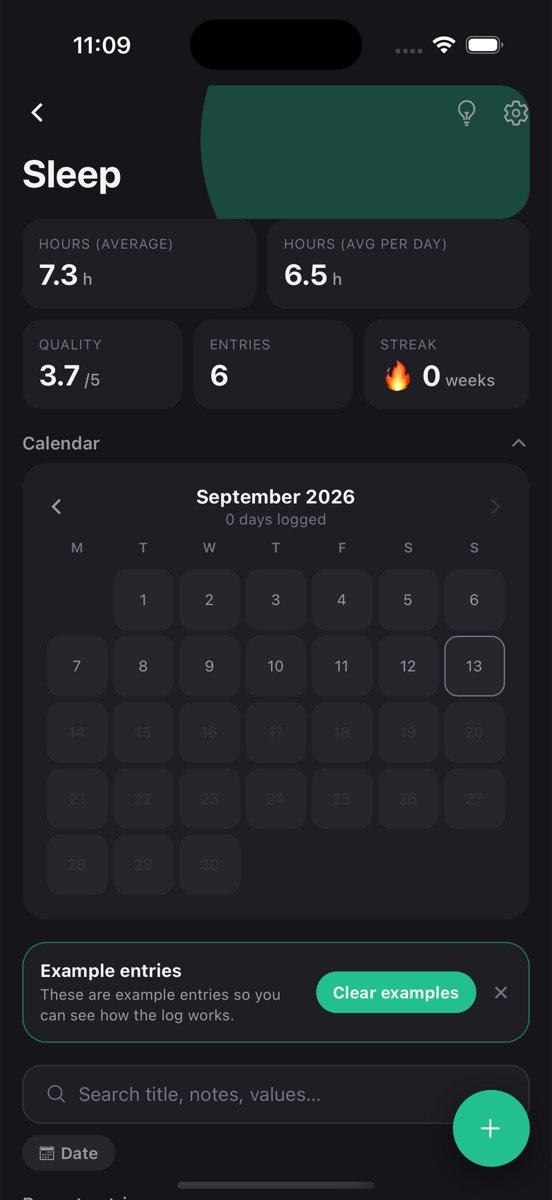
The log is created with the variables above and a few example entries so you can see how it works. Clear them with one tap.
Tap plus, fill in what you have, save. Timer, location, notes and photos are there when you want them, hidden when you don’t.
Average hours sits on the log card, with the rest one tap away. Set a goal if you want a nudge.
Average hours and average quality sit on the log card. Two numbers, updated every morning, that answer “am I sleeping enough” honestly.
A note on the nights that went wrong is enough. After a few weeks the notes on the low-score nights tend to say the same thing.
Set the reminder for the time you usually get up and the log fills itself in as part of the routine.
The Sleep log is one log among many you can keep. Every one of them gets the same tools.
Tap the bulb on Sleep and get a plain-language read of your trends, what changed recently, and a suggested next goal, built only from your own entries.
Set a target like three times a week, watch the rolling progress bar, keep a streak, and get a reminder at the time you actually log. The app learns that time from you.
Every log has its own month view showing which days you logged. Gaps are obvious, consistency is visible, and one tap opens that day's entries.
Every exercise in a workout, every piece in a practice session: logged together in one entry, broken out automatically in the stats.
Attach a photo, draw a quick sketch, or record a voice note on any entry. They stay with that entry and come back on every device you sign in on.
Drop a pin or search for the place. Each log has a map view of everywhere you logged, and saved places open directly in Google Maps.
Find an entry by title, note or value across every log, filter by date or location, and jump straight to it.
Entries save on your phone first and sync when you sign in. No account needed to start, no feed, no one else sees your data.
People who do not want to wear a device to bed, anyone whose doctor asked how they sleep and got a shrug, and those trying to fix a specific problem: late screens, coffee timing, an irregular schedule.
It also suits parents and shift workers whose sleep is fragmented; each block can be its own entry and the daily rate still comes out right.
The average tells you the truth about quantity. The minimum tells you how bad the bad nights are. The quality score next to the notes is where the useful part lives: the same note keeps appearing on the low nights.
A weekly goal of seven entries is not about sleep at all; it is about not skipping the log, which is the only way the averages mean anything.
Doctors ask how often, how bad, how long and what came before. The five fields that answer that, how to log in thirty seconds, and what to bring.
5 min readDream signs are the recurring places, people and oddities in your dreams. How to journal so they surface, search for them, and turn them into lucid dreams.
For the questions most people have — am I getting enough, what ruins it — yes. You know roughly when you went to bed and got up. A wearable adds sleep stages, which is a different question.
Yes. Log a second entry that day with the nap hours, or add a “Nap” variable so naps and nights stay separate in the stats.
Add a number variable such as “Coffees” to the same log and enter it the next morning. It shows up right next to the quality score.
Free to start. Your logs stay on your phone until you sign in, then they back up and sync.